Install and configure
One .env lives at the monorepo root and every app reads it. The one value you must set before anything collects data is FALORB_SALT_SECRET: it is what the daily-rotating IP hash salt is derived from, and it is the reason no raw address is ever stored.
Generate secrets with openssl rand -base64 32. Rotate BETTER_AUTH_SECRET before the first real account exists. It signs session cookies, so changing it later signs everybody out.
git clone https://github.com/obhox/Falorb.git
cd Falorb
pnpm install

# then set FALORB_SALT_SECRET
cp .env.example .envBring up the data stores
Postgres 17 for the control plane and person profiles, Redis 7 with append-only persistence as the buffer between collection and storage, and ClickHouse 25.3 for events. The compose file ships ClickHouse already tuned for a shared host: capped memory and pools, bounded system logs.
Redis sits in the middle deliberately: it is what stops a slow or restarting ClickHouse from becoming a slow response on somebody else's website.
docker compose -f infra/docker-compose.yml up -dMigrate and seed
Two migration runners, because the two stores are genuinely different: Drizzle for Postgres, and a purpose-built runner for ClickHouse that splits statements, substitutes placeholders and redacts credentials from any error it reports.
Sign up in the dashboard first, then re-run the seed with SEED_OWNER_EMAIL set to your address. Otherwise the seeded properties belong to an organization your account is not a member of.
pnpm --filter @falorb/db migrate      # Postgres
pnpm --filter @falorb/db ch:migrate   # ClickHouse
pnpm --filter @falorb/db seed
pnpm --filter @falorb/tracker buildStart the services
The collector validates, enriches, hashes the IP and publishes to Redis, and answers in single-digit milliseconds because it does none of the writing itself. The worker consumes the stream, writes to ClickHouse and runs the 11 scheduled jobs behind identity resolution, sessionization, path transitions, interest scoring, enrichment, alerts, GDPR requests and retention.
Production deployment# collector
bun apps/ingest/src/index.ts
# worker + scheduler
pnpm --filter @falorb/worker start
# dashboard
pnpm --filter @falorb/web devInstall the tracker
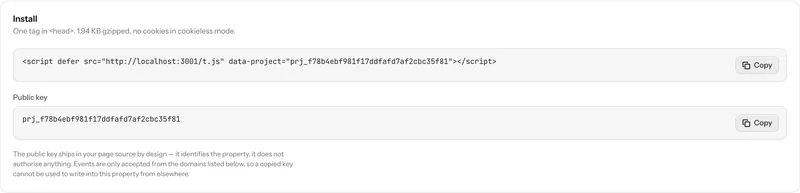
Creating a property returns its install snippet, and the property settings page shows it again. Paste it into your site's head. The script is 2,943 bytes gzipped, patches the History API so a single-page app reports route changes with no extra wiring, and queues any call made before it finishes loading.
Everything the tracker collects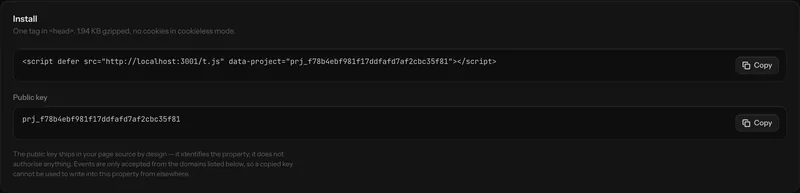
<script defer
  src="https://a.example.com/t.js"
data-project="prj_8Kd2mQ"></script>falorb.identify(user.id, { email: user.email })
falorb.track('checkout_started', { plan: 'pro', seats: 3 })
falorb.revenue(99, 'USD')
falorb.reset() // on sign-outCheck it rather than trust it
- Query layer
- pnpm --filter @falorb/queries smoke (all 32 queries against live ClickHouse)
- Background jobs
- pnpm --filter @falorb/worker verify:jobs (runs all 11 once)
- MCP server
- pnpm --filter @falorb/mcp smoke (31 checks with a real MCP client)
- Tracker size
- pnpm --filter @falorb/tracker size (fails the build over 3 KB)
- Dashboard
- pnpm --filter @falorb/web e2e (41 browser tests over every route)
- Pipeline
- node scripts/loadtest.mjs (asserts every acknowledged event reached ClickHouse)
Getting started, the sticking points
What do I need on the machine?
Node 22 or newer, pnpm, Docker for the data stores, and Bun if you want to run the collector the way the reference deployment does. A small VPS is enough for a portfolio at the traffic this is designed for.
The dashboard is empty after seeding. Why?
The development seed creates properties but no membership, so a fresh signup lands in an empty portfolio while the seeded data sits in an organization nobody belongs to. Sign up first, then re-run the seed with SEED_OWNER_EMAIL set to your address.
Do I have to change any secrets before going live?
Two. FALORB_SALT_SECRET must be set, because it is the basis of the IP hashing. And BETTER_AUTH_SECRET ships as a low-entropy placeholder that better-auth warns about on every boot; it signs session cookies, so rotate it before the first real account exists rather than after, because rotating it signs everybody out.
How do I get the demo data in the screenshots?
Sign up in the dashboard, then run the demo seed with SEED_DEMO_OWNER_EMAIL set to your address. It builds its own organizations and is destructive only to those, so re-running never disturbs the development seed.
Something missing or wrong? Open an issue.
Then point an assistant at it
Falorb ships an MCP server with 25 tools, so once data is arriving you can ask questions of it in plain language instead of building the report.